# fancyqr
[](https://www.latex-project.org/) [](http://makeapullrequest.com) [](https://www.ctan.org/pkg/fancyqr) [](https://github.com/EagleoutIce/fancyqr/actions/workflows/compile.yaml)
[](qr-example.tex)
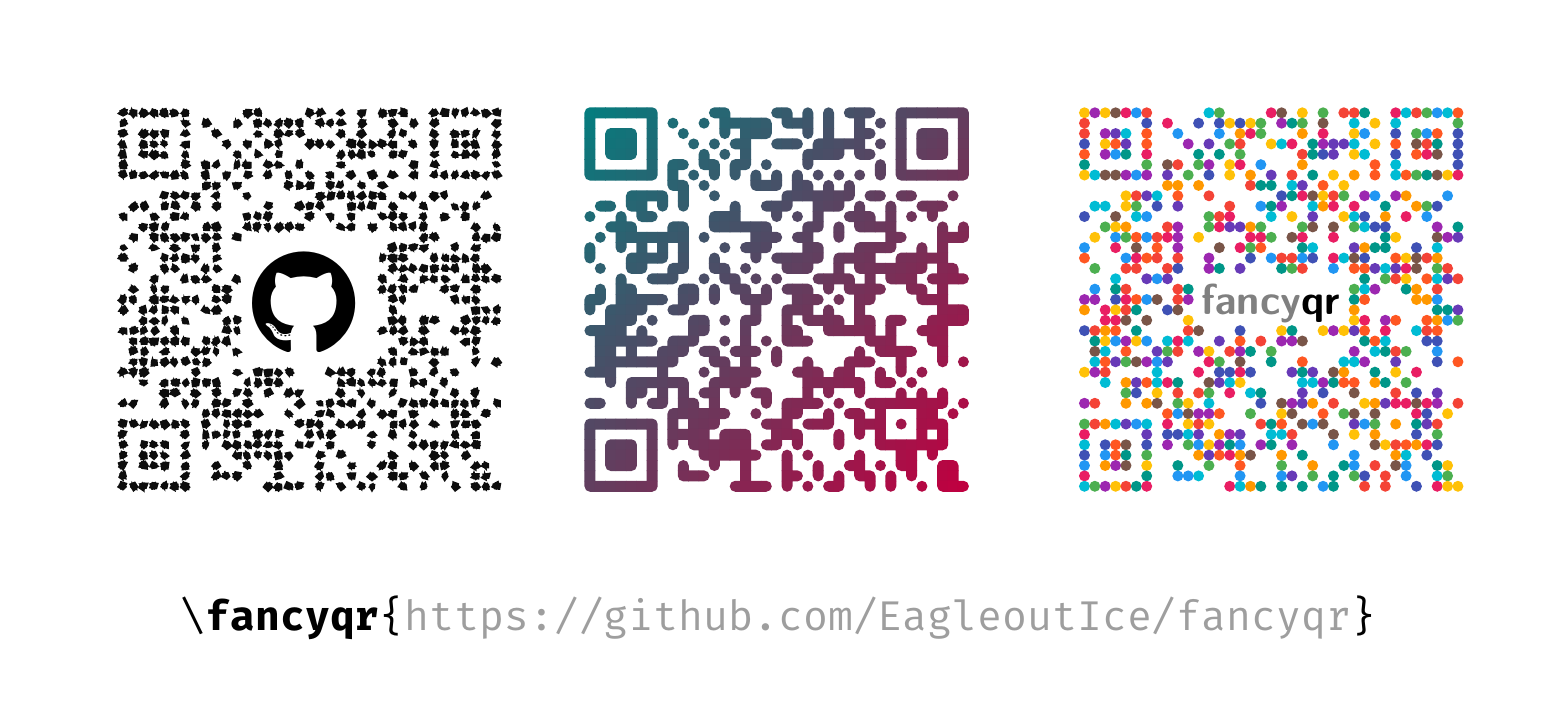
A simple package to create fancy qr-codes with the help of the [`qrcode`][qrcode]-package.
You may use `\fancyqr` just like the normal `\qrcode` (`\fancyqr[]{}`). See the [documentation](https://github.com/EagleoutIce/fancyqr/raw/gh-pages/fancyqr-doc.pdf). If you just want to create a simple qr-code, please refer to the [minimal example](qr-minimal.tex). The package also ships an `l3build` test suite in `tests/`, which you can run with `l3build check`. `l3build scan` (tests/scan/scancheck.py) scans 1000 random codes over all styles with zxing and ZBar at 100, 150 and 300 dpi. The manual is built with `l3build doc` and needs the `xlistings` submodule (clone with `--recurse-submodules`, or run `git submodule update --init`).
*fancyqr* is actively developed by *Florian Sihler* (contact me at: ) under the [LPPL Version 1.3c](LICENSE) (please note that this changed on 2026-02-27 from GPL v3, versions **after** v2.2 are licensed with LPPL 1.3c). I am very happy about every contribution (see [CONTRIBUTING.md](CONTRIBUTING.md)). You can find it on CTAN ().
To hide the center (for example, to put a logo there), use the `image` option, or hide a rectangle by hand with `\FancyQrDoNotPrintSquare{}{}`. `\FancyQrDoNotPrintRadius{}` rounds its corners ([#41](https://github.com/EagleoutIce/fancyqr/pull/41)), and `\FancyQrHardCut` cuts the modules at its edge straight instead of rounding them (`\FancyQrRoundCut`, the default).
Besides `default`, there are twelve styles. Load one with `\FancyQrLoad{}` (the change stays local to the current group), and switch back with `\FancyQrLoad{default}` or `\FancyQrLoadDefault`:
- `rounded`: like `default`, but with sharp inner corners (the look before v2.4)
- `flat`: plain squares, used by the `classic` option
- `frame`: outlines of the module groups with a dot in every module. The finder patterns are square with round cores by default, so the code scans as it is.
- `dots`: one dot per module
- `blobs`, `glitch`: random styles. Use `seed` to get the same result on every run
- `goo`: drips of many kinds (sags, strands, double drips and more), varied per tile. Random, use `seed`.
- `glows`: a soft glow around every tile, tuned with `\FancyQrGlow{}{}{}` and `\FancyQrGlowColor{}{}`
- `halloween`: orange and purple tiles dripping slime. The finder rings follow the gradient, and the finder cores are pumpkins, jack-o'-lanterns, ghosts or skulls tinted by it, drawn at random (`finder core=halloween`). Figures are drawn in the tile color on blocks of dark modules that fit them, and replace the modules they cover: grim reapers, big and small jack-o'-lanterns, ghosts (varied hems and faces, including a happy big ghost), graves (rare), crosses, witch hats, witches with a cauldron (facing left or right), flying witches, brooms, fences, candelabras, scythes, lanterns, street lamps, bats (open-wing, flying, hanging), spiders (varied pose and position, hanging from a tile above, or sitting), skulls, eyeballs and eyes, bones with varied breaks on L-shaped groups, and many kinds of candy. Small single-module figures (pumpkins, potions, candles, a devil blob) also fit, and timing patterns carry small figures. Decorations are spider webs sized to the free white space, with long hanging threads, and slime and timing figures. Each figure has a chance, `\fancyqr@@chance`, for example `\fancyqr@reaper@chance` (1) or `\fancyqr@bat@chance` (.2). The slime is tuned with `\fancyqr@slime@chance` (.35) and `\fancyqr@slime@length` (.47). Random, use `seed`. The same code always gets the same figures.
- `snow`: snow lies on the top edges of the tiles, not on the top row, with ice running down over the tiles and pale drips of melting snow of varied length below. Pale snowflakes fall in the white gaps. Whole rows get snow or stay bare. The snow lies on the tiles without cutting into them, and it ends flush at the walls. It does not change the gradient. Tuned with `\fancyqr@snow@chance` (.7), `\fancyqr@snow@height` (.32), `\fancyqr@snow@wave` (.1), `\fancyqr@snow@color` and `\fancyqr@snow@line`. Random, use `seed`.
- `castle`: masonry in a running bond whose colors follow the gradient, with walls that have battlements, towers with roofs and flags, turrets, tree clumps, keeps, gatehouses, halls, castles, citadels, houses, tents, wells, huts, wooden watchposts, stone turrets, trees, mountain ranges, volcanoes, a rare dragon and training grounds (a target, a dummy or both), crop fields, and courtyards of packed earth inside the walls. Banners and figures on tower tops are drawn too. Rivers with forks, ponds and faint waves run across the map, and alignment patterns are ponds with a boat. The finder patterns are fortresses with a moat, windows, a drawbridge mostly at the bottom, gate and keep. Archers and knights guard the walls, and a rare princess appears in a tower window. Grass is the default background (`background`), and user colors are respected. Each building has a chance, `\fancyqr@@chance`. The same code always gets the same buildings.
- `christmas`: pine and teal tiles with gold and cranberry accents, and snow on top by default, following the tile edges. Tiered trees with trunks and a star, candy canes in six orientations, presents, baubles, sledges, a bench, toy trains, drums, stockings and nutcrackers. Light chains hang across the gaps between tiles, and pale stars, snowflakes and candles sit in open white. The timing patterns carry lights, and the finder cores are drawn at random (baubles, light rings, gifts, snowflakes, candy canes). Tuned with `\fancyqr@tree@chance`, `\fancyqr@cane@chance`, `\fancyqr@present@chance` and `\fancyqr@bauble@chance`. The same code always gets the same decorations.
The decorations of one style can be added to another, for example castle walls with spider webs: `\fancyqr[style=castle,add=halloween]{...}`. `place` puts figures where you want them.
`halloween`, `snow`, `castle` and `christmas` bring their own colors or finder shapes. Options passed to `\fancyqr` still override them, and loading another style restores what was set before. All styles work with pdfLaTeX, LuaLaTeX and XeLaTeX.
The three big squares in the corners (finder patterns) and the smaller alignment patterns can get their own shape and color. For example, flat black data with teal rings, orange cores, and alignment patterns drawn like the data:
```latex
\fancyqr[content color=black,finder=rounded,finder color=teal!60!black,
finder core color=orange,alignment=inherit]{https://github.com/EagleoutIce/fancyqr}
```
**Text beyond ASCII** (umlauts, other scripts, emoji) works with pdfLaTeX, LuaLaTeX and XeLaTeX. fancyqr stores it as UTF-8 and adds a short ECI header that tells the scanner so. `eci=false` leaves the header out. Use it as a fallback if a scanner rejects codes with an ECI header (Google ML Kit reportedly does), at the cost that some scanners (ZBar) then garble non-ASCII text.
If you write your own style, `\FancyQrPasses{}` draws every module `` times, `\FancyQrStyleSet{}` sets options that are undone when the next style loads, and `\FancyQrInnerRoundings` or `\FancyQrNoInnerRoundings` tells fancyqr whether the style draws inner corners. `\FancyQrFigure[*]{}{}{}{}` replaces blocks of dark modules that match a pattern with a figure drawn by ``. The pattern is rows separated by `/`: `x` is a dark module of the figure, `1` a dark module, `0` a white one and `.` any module. Bigger figures are placed first, the placement is deterministic, and figures never land on the finder or alignment patterns, the hidden center or other figures. The starred form marks grid positions instead of pattern matches. `\FancyQrFigureTile{}` wraps a tile so that it draws the figure at its first module and nothing at the others. Neighbouring tiles end cleanly against figures. `\FancyQrFigureAt{}{
}` places a figure at a grid position, and `\FancyQrDiagonals` gives the tiles `\@upleft`, `\@upright`, `\@downleft` and `\@downright` for their diagonal neighbours. `\FancyQrIfTiming{}{}` expands to `` if the current tile is part of a timing pattern, and to `` otherwise.
`\FancyQrListFigures` and `\FancyQrListExtras` log the names of the figures and decorations, `\FancyQrShowFigure` and `\FancyQrShowPattern` draw one, and `\FancyQrFigureGallery`, `\FancyQrExtraGallery` and `\FancyQrTileGallery` draw the figures, decorations and tiles. Style authors also get `\FancyQrExtra`, `\FancyQrIfExtra`, `\FancyQrExtras` and `\FancyQrSince` for decorations (see the manual for their arguments). The manual shows every figure, tile and decoration of each style, generated from the style files.
These are the extra options (set them for all following codes with `\fancyqrset{}`):
| Option | Type | Default | Explanation |
| ------------------ | ----------------------------------------- | :------------: | ------------------------------------------------------------------------------------------------------------------------------------------------------------------------------------------------ |
| `alignment` | `finder`/`inherit`/`hide` | `finder` | `finder` styles the alignment patterns like the finder patterns, `inherit` draws them like the data, `hide` replaces them with modules that look like data (test that the code still scans). |
| `alignment color` | color | | Color of the alignment patterns. Defaults to `finder color`. |
| `alignment core color` | color | | Color of the alignment cores. Defaults to `alignment color`, or to `finder core color` if that is not set. |
| `background` | color | none | Fill behind the whole code, including the padding. |
| `background radius` | number | `1` | Corner radius of the `background`, in modules. `0` gives square corners. |
| `cache` | boolean | `true` | Remember codes that were already computed, so drawing the same code again is fast. |
| `externalize` | boolean | `false` | Turn every recorded code into a pdf of its own and include it. Needs `-shell-escape`, or compile the written files yourself. |
| `externalize prefix` | text | `-fqr-` | Where the records and externalized pdfs go. |
| `figures` | list, `all` or `none` | `all` | Draw only the figures named. `bone*` stands for every figure starting with `bone`. `\FancyQrListFigures` logs the names. |
| `figure chance` | `{name=value,...}` | | Frequency of the named figures. |
| `no figures` | list | | Leave out the figures named, in the same way. |
| `place` | `{name=row/col,...}` | | Put a figure at a module, or at the closest place it fits. |
| `extras` | list, `all` or `none` | `all` | Draw only the decorations named, in the same way as `figures`. `land/*` stands for every decoration starting with `land/`. |
| `no extras` | list | | Leave out the decorations named. |
| `persist` | boolean | `true` | Record every code in a file `.fqr` and replay it in later runs, so only the first run draws. |
| `classic` | boolean | `false` | Black, square modules, like a normal QR code. Loads the `flat` style. |
| `color` | color | | One color for the whole code. Turns off the `gradient`. |
| `compensate` | length | | Tile overlap as a fixed length. Turns off `overlap`. |
| `content color` | color | | Color of the data, that is, everything except the finder and alignment patterns. |
| `eci` | boolean | `true` | Mark text beyond ASCII as UTF-8, so scanners do not guess the character set. |
| `finder` | `inherit`/`square`/`rounded`/`circle` | `inherit` | Shape of the pattern rings. `inherit` (or `none`) keeps the tiles of the style. |
| `finder color` | color | | Color of the finder and alignment patterns. |
| `finder core` | `auto`/`inherit`/`none`/`square`/`rounded`/`circle`/`star`/`pumpkin`/`halloween` | `auto` | Shape of the pattern cores. `auto` uses the ring shape. Other values work even if the ring keeps its tiles. |
| `finder core color` | color | | Color of the pattern cores. Defaults to `finder color`. |
| `finder radius` | number | `0.5` | Corner radius of the `rounded` shape. |
| `finder thickness` | number | `1` | Width of the ring, in modules. |
| `gradient` | boolean | true | Turn the color gradient on or off. |
| `gradient angle` | angle | `135` | Direction of the gradient, in degrees. `0` runs from left to right. |
| `image` | LaTeX | | Content to put in the center. The modules behind it are hidden.[^1] |
| `image padding` | number | | Hide this many extra modules around the image. |
| `image x padding` | number | `0` | Same, left and right only. |
| `image y padding` | number | `0` | Same, top and bottom only. |
| `inner rounding` | number | `0.25` | Radius of inner corners. `0` makes them sharp. |
| `l color` | color | *see below* | Gradient color at the left end. With the default angle, this is the bottom right. |
| `left color` | color | | Same as `l color`. |
| `level` | L/M/Q/H | `M` | [`qrcode`][qrcode] error correction: low, medium, quartile, high. |
| `overlap` | number | `0.045` | How much neighbouring tiles overlap, as a fraction of a module. Hides thin white lines that some PDF viewers draw between tiles. |
| `padding` | flag | | [`qrcode`][qrcode] option: add a white border around the code. |
| `r color` | color | *see below* | Gradient color at the right end. With the default angle, this is the top left. |
| `random color` | colors | | List of colors. Every module gets a random one. Needs `pgfmath`. |
| `right color` | color | | Same as `r color`. |
| `rounding` | number | `0.5` | Corner radius of the tiles in the `default` style. |
| `seed` | integer | | Fixed random seed, so the random styles (`blobs`, `glitch`, `goo`, `halloween`, `snow`, `christmas`) look the same on every run, including their figures and finder designs. |
| `size` | length | | Size of the code. Same as [`qrcode`'s][qrcode] `height`. |
| `style` | style name | | Style for this one code. The other options override it. |
| `tight` | flag | | [`qrcode`][qrcode] option: no white border. |
| `timing color` | color | | Color of the timing patterns, the dotted lines between the finder patterns. |
| `version` | 0–40 | `0` | [`qrcode`][qrcode] option: size of the module grid. `0` picks the smallest one that fits. |
| `width` | length | | Same as `size`. |
The defaults are set like this:
```LateX
\fancyqrset{image padding=0,gradient=true,gradient angle=135,r color=red!68!black!88!white!90!white,
l color=purple!40!red!20!black!90!white}
```
[^1]: The image keeps its own size and does not scale with the code. If the code no longer scans, use a higher `level` (for example `level=H`) or a smaller image.
[qrcode]: https://www.ctan.org/pkg/qrcode
 ](qr-example.tex)
A simple package to create fancy qr-codes with the help of the [`qrcode`][qrcode]-package.
You may use `\fancyqr` just like the normal `\qrcode` (`\fancyqr[
](qr-example.tex)
A simple package to create fancy qr-codes with the help of the [`qrcode`][qrcode]-package.
You may use `\fancyqr` just like the normal `\qrcode` (`\fancyqr[